| This article is written from the Real Life point of view |  |
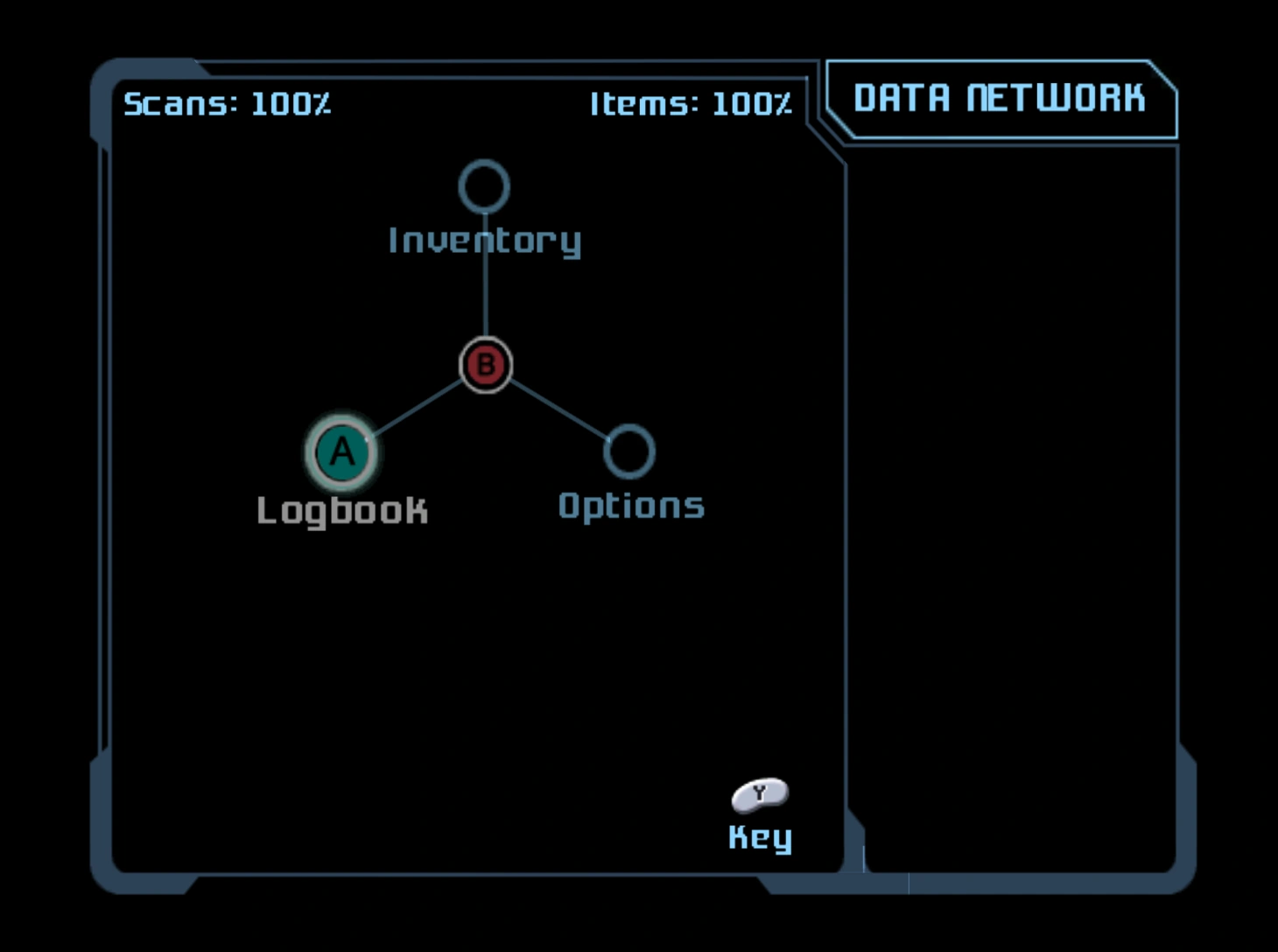

The Data Network is a gyroscopic interface that serves as the pause menu in Metroid Prime 2: Echoes. Stored within Samus Aran's Power Suit, it contains an entire database of information to assist her on her mission. It allows access to the Logbook and Inventory, as well as the game's Options, but not the Map, which has a separate menu. To access different entries, the gyroscope must be rotated until the intended entry is highlighted, and then the A button must be pressed. To return to the previous menu, the B button must be pressed. The Samus Data Screen in Echoes uses a similar interface.
The Data Network meticulously organizes Logbook and Inventory data, placing entries into a category tree. For example, in the Creatures category of the Logbook, every type of Space Pirate and Metroid, as well as each individual form of Dark Samus, are categorized under "Offworld", while Aether creatures are organized by Flying, Ground, Aquatic, and Mechanoids. These are then categorized by size, prowler type, and predation. Each entry displays a model of the subject, which can be viewed from different angles.
Official Data
Metroid Prime manual
- SAMUS'S DATABANKS
- "Samus's suit can store a huge quantity of data that will help her along her journey. Most information, with the exception of the map, can be accessed by pressing START/PAUSE during game play. Once the Inventory screen appears, you can use the L and R Buttons to view the Options screen or the Log Book screen."
Metroid Prime 2: Echoes manual
- DATA NETWORK
- "Samus's suit can store immense amounts of data that will help her along her journey. Most of these, with the exception of the map, can be accessed by pressing START/PAUSE during game play. Once the Data Network screen appears, use the Control Stick and the A Button to select the Options (pg. 9), Logbook, or Inventory screens."
Metroid Prime Trilogy manual
Metroid Prime
- Pause Screen
- "Press the 2 Button to display the Pause Screen. Use the + Button and the - Button to switch between the Inventory Screen, the Log Book Screen, and the Options Screen. Use the Control Stick or +Control Pad to select and press the A Button to confirm."
Metroid Prime 2: Echoes
- Pause Screen
- "Press the 2 Button to display the Pause Screen. Use the Control Stick to select and press the A Button to confirm."
Metroid Prime 3: Corruption
- Pause Screen
- "Press the 1 Button during the game to display the Pause Screen. Select one of the four icons shown on the left with the pointer. Press the A Button to confirm and open the Map Screen, Logbook Screen, Inventory Screen, or Options Screen. Press and hold the 2 Button to see details of the controls for each screen.
*Samus's current location - Samus is facing the direction of the arrow.
*Sub-Menu - The options shown here depend on which menu has been selected."
Trivia
- When entering a section, if the A button is pressed quickly enough in succession and at the right timing, an option that is not registered may be selectable. This allows for certain creatures or items not yet obtained or recorded to be seen long before they are actually encountered. Occasionally, an option choice may lead to a blank page in the Logbook, with no visible choices to be seen and the noise of an option moving around can be heard. Despite a blank page, a default choice can still be pressed to view. This trick only works once per start-up of the game. This has only been known to work on a select few choices, with the following being able to be seen earlier than expected:
- An earlier version of the Data Network can be seen within the Metroid Prime 2: Echoes Bonus Disc via hacking. The early version has orange bars around a highlighted section within the sidebar. Unique to this early version is a shifting background of digital hexagons added for effect, continuously pulsating from the left to the right side of the screen. The sections themselves, as well as some entries, are slightly organized differently than the final game, with some Logbook models untextured, missing, or filled with placeholder objects in their place (a Chozo Artifact or a Samus logo object). Many (if not all) creature models are in their idle or T-poses. The Y button (Legend) does not appear to function, nor is there a button to zoom in on a model.
Gallery
